
SDK Customization
Your app's theming and customization can be configured in two ways:
SDK Initialization
The values you set directly in your app when integrating the SDK. This is how you customize your brand experience today.
Business Portal Configuration
Coming soon — configure your brand directly from the Vrtx Business Portal, no app changes required.
White-labeled and ready to be customized
Every SDK Customization default — brand colors, spacing, radius, and sizing — ships white-labeled out of the box, so making it yours is just a matter of setting values at SDK Initialization, no design rework or approval cycle required.
How to customize my SDK?
Configure your theme
Go to your SDK initialization code and set your brand's colors, spacing, radius, and sizing values.
Build your app
Rebuild and run your app as usual — the SDK reads your theme configuration and applies it automatically at runtime, no extra build steps required.
View the new theme that matches your application
Launch the app to see your brand colors, spacing, and radius applied across every SDK screen, from the Home screen to card details.
Branding
The top-level brand assets applied throughout the app.
| What | Description | Recommendations |
|---|---|---|
| Brand name | Your business name, shown at the top of the Home screen. | Keep it short — long names may be truncated on smaller screens. |
| Brand logo | Your logo, shown next to your brand name. | Use a transparent PNG for the best result. |
| Card image | The artwork shown on the wallet card throughout the app. | Use an image close to standard card proportions (about 1.586:1). If you don't provide one, a gradient built from your Card gradient colors is shown instead. |
Colors
Brand colors can be set per platform, covering buttons, text, fills, backgrounds, gradients, and accent states.
Colors are provided as typed color values in your app code, for example Color(0xFFFF383C).
Brand color
The primary interactive color and its matching label color.
| Field | Key | Description | Recommendations |
|---|---|---|---|
| Primary | primary | Used for primary buttons and selected states, such as radio buttons and chips. | This should be your brand's main color — the one most associated with your identity. |
| Button label | buttons_label | The text color on primary buttons and selected chips. | Choose a color with strong contrast against your primary color — usually white or black. |
Text colors
Text color roles used across screens, from titles to disabled states.
| Field | Description | Recommendations |
|---|---|---|
| Primary | Your main text color — titles, body copy, and input values. | Should have strong contrast against your backgrounds for easy reading. |
| Secondary | Subtitles, placeholders, and hint text. | A softer shade of your primary text color works well. |
| Tertiary | Supporting text and icons on a few screens. | Keep it close to your secondary text color. |
| Quaternary | Used for disabled selection states. | A muted, low-contrast tone. |
Fill colors
Background fill roles for cards, buttons, dialogs, and other UI containers.
| Field | Description | Recommendations |
|---|---|---|
| Primary | Dialog backgrounds and disabled buttons. | A neutral, low-contrast tone. |
| Secondary | Disabled button backgrounds and unselected states. | Should be distinct enough to read as "inactive" without drawing attention. |
| Tertiary | Dividers and row backgrounds. | Keep subtle. |
| Quaternary | Unselected chip and date-picker backgrounds. | A light, neutral tone. |
| Vibrant secondary | Text color on the account details screen. | Choose a higher-contrast tone than your regular secondary fill. |
Background colors
Screen-level background colors used behind your app's content.
| Field | Description | Recommendations |
|---|---|---|
| Primary | The default screen background. | Often white or a very light neutral. |
| Secondary | Background for sections like text fields and OTP input. | A subtle step away from your primary background. |
Card gradient
Shown on the wallet card when no card image is provided.
| Field | Key | Description | Recommendations |
|---|---|---|---|
| Gradient stop 1 | wb_01 | The gradient's starting color. | Choose two colors from your brand palette that blend well together. |
| Gradient stop 2 | wb_02 | The gradient's ending color. | See above. |
Accent colors
Semantic colors for error, success, and other status states.
| Field | Description | Recommendations |
|---|---|---|
| Red | Used for error states — text fields, OTP, passcode, and verification screens. | A clear, standard red is easiest for users to recognize. |
| Green | Used for success states and credit transaction amounts. | A clear, standard green works best. |
Spacing
Controls the padding and spacing between elements throughout the app.
VrtxSpacing(md = 12.dp, lg = 24.dp)| Token | Default | Description | Recommendations |
|---|---|---|---|
x0 | 0 | Text field padding. | Use for elements that should sit flush against their container. |
xxs | 2 | Button padding. | The tightest spacing value — small changes here are easy to miss. |
xs | 4 | Buttons, text fields, card delivery tracker. | — |
sm | 8 | Buttons, text fields, chips, dialogs, OTP input. | A frequently used value — changes here will be noticeable across several screens. |
md | 12 | Screen layout padding, text fields, chips, OTP input, wallet card. | One of the most visible spacing values in the app — test changes across multiple screens before finalizing. |
ml | 16 | Screen layout padding, text fields, OTP input, dialogs. | — |
lg | 24 | Buttons, text fields. | Good for adding visible breathing room around key actions. |
Radius
Controls how rounded corners appear throughout the app — buttons, cards, dialogs, and more.
VrtxRadius(md = 16.dp, full = 1024.dp)| Token | Default | Description | Recommendations |
|---|---|---|---|
s | 8 | Transaction details screen. | A subtle, minimal rounding. |
sm | 12 | Wallet card. | — |
md | 16 | Card corner radius — the SDK's most common radius, used on text fields, cards, dialogs, bottom sheets, and most screens. | The most impactful radius value to adjust — it sets the overall "roundedness" feel of the app. |
ml | 24 | Button corner radius. | Pair with your md value for a consistent look between cards and buttons. |
lg | 32 | Bottom sheets. | — |
xl | 48 | One text field style. | — |
full | 1024 | Fully-rounded elements — buttons, chips, radio buttons. | Any value large enough to reach full roundedness — no need to fine-tune further. |
huge | 2048 | One Home layout variant. | Only relevant if you use that specific layout variant. |
Sizing
Controls the size of specific components and icons.
VrtxSizing(sm = 24.dp)| Token | Default | Description | Recommendations |
|---|---|---|---|
sm | 24 | A text field icon. | Match this to your icon's intended visual size, and avoid scaling icons non-uniformly. |
Layout design options
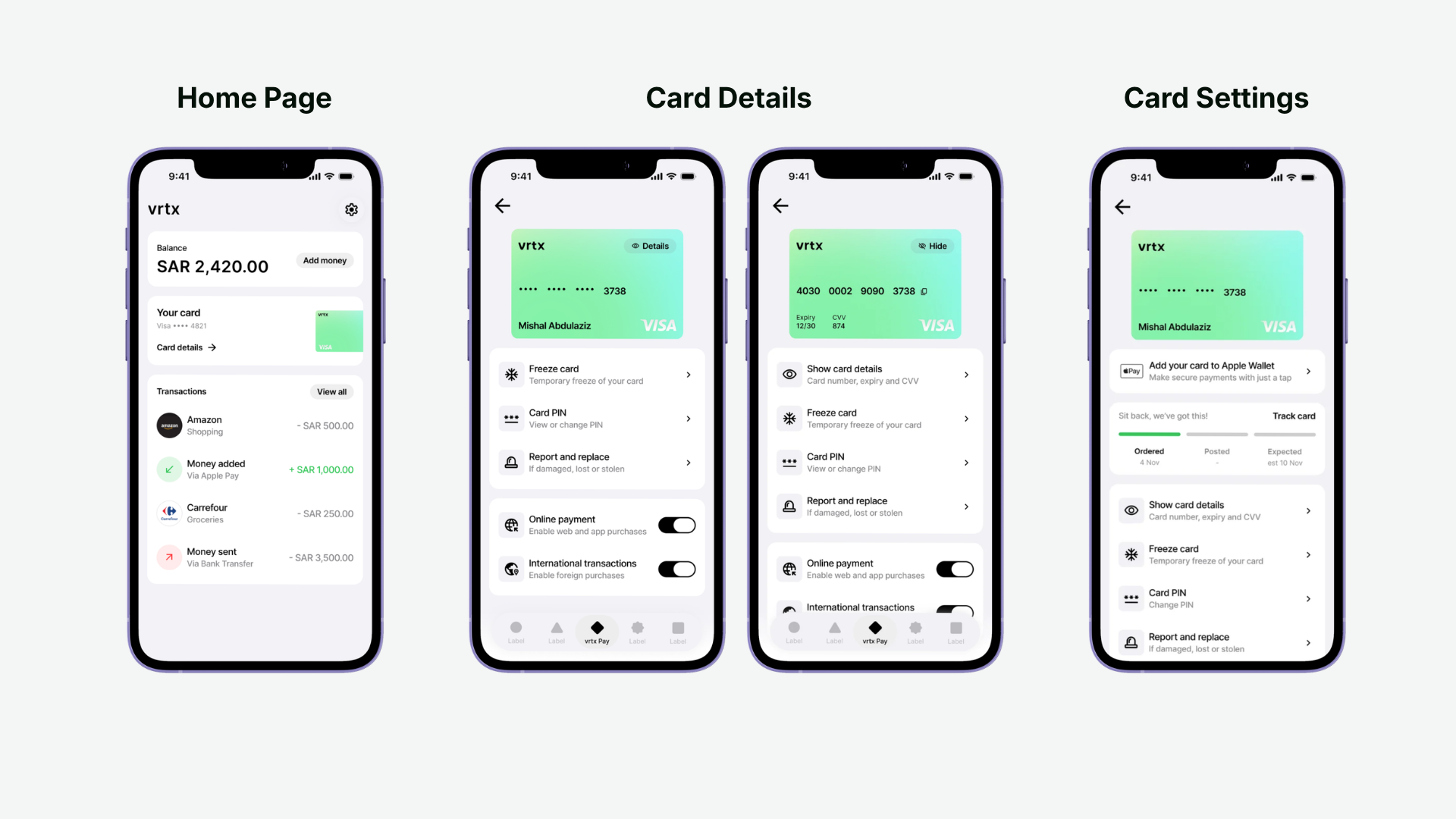
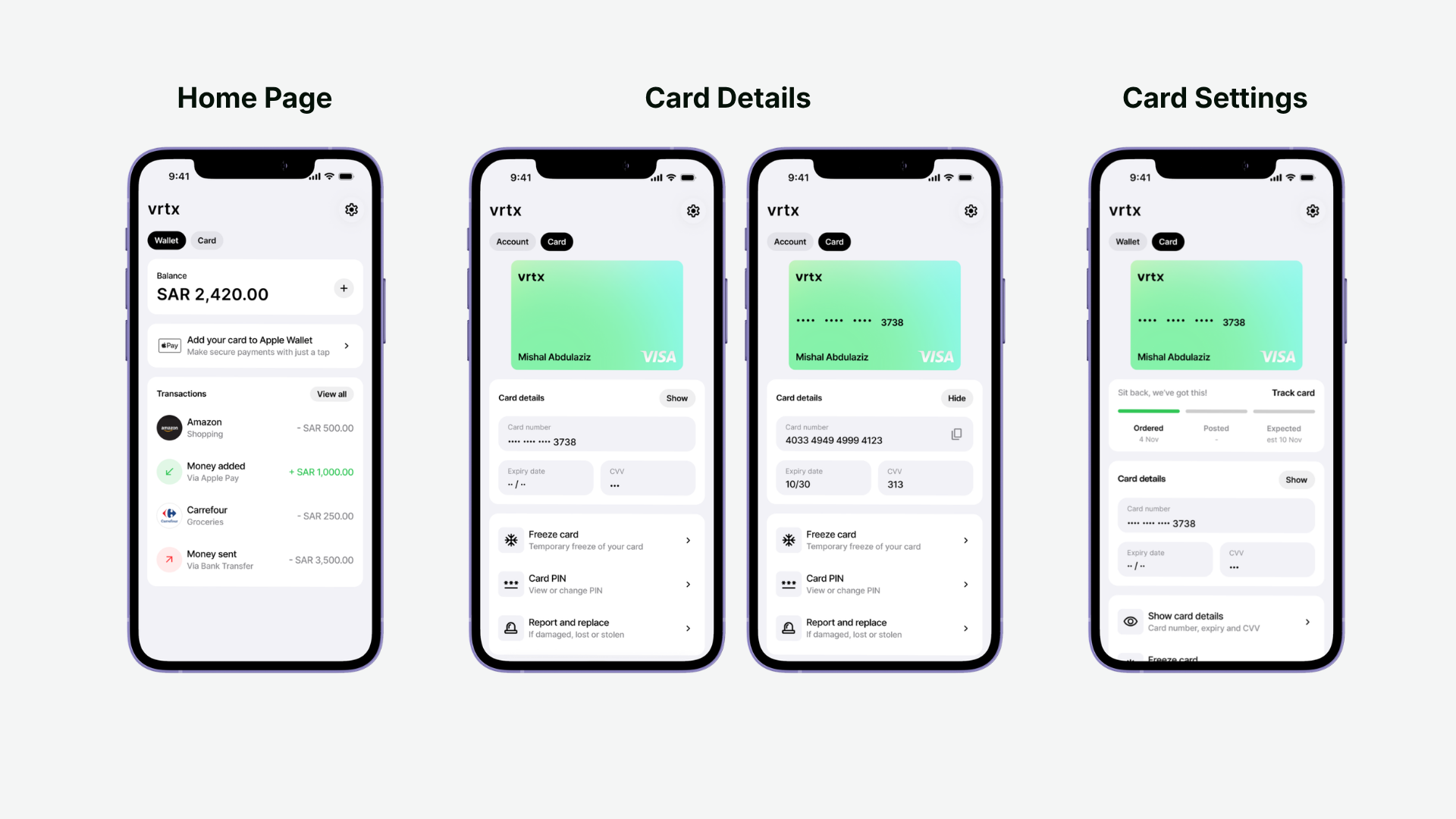
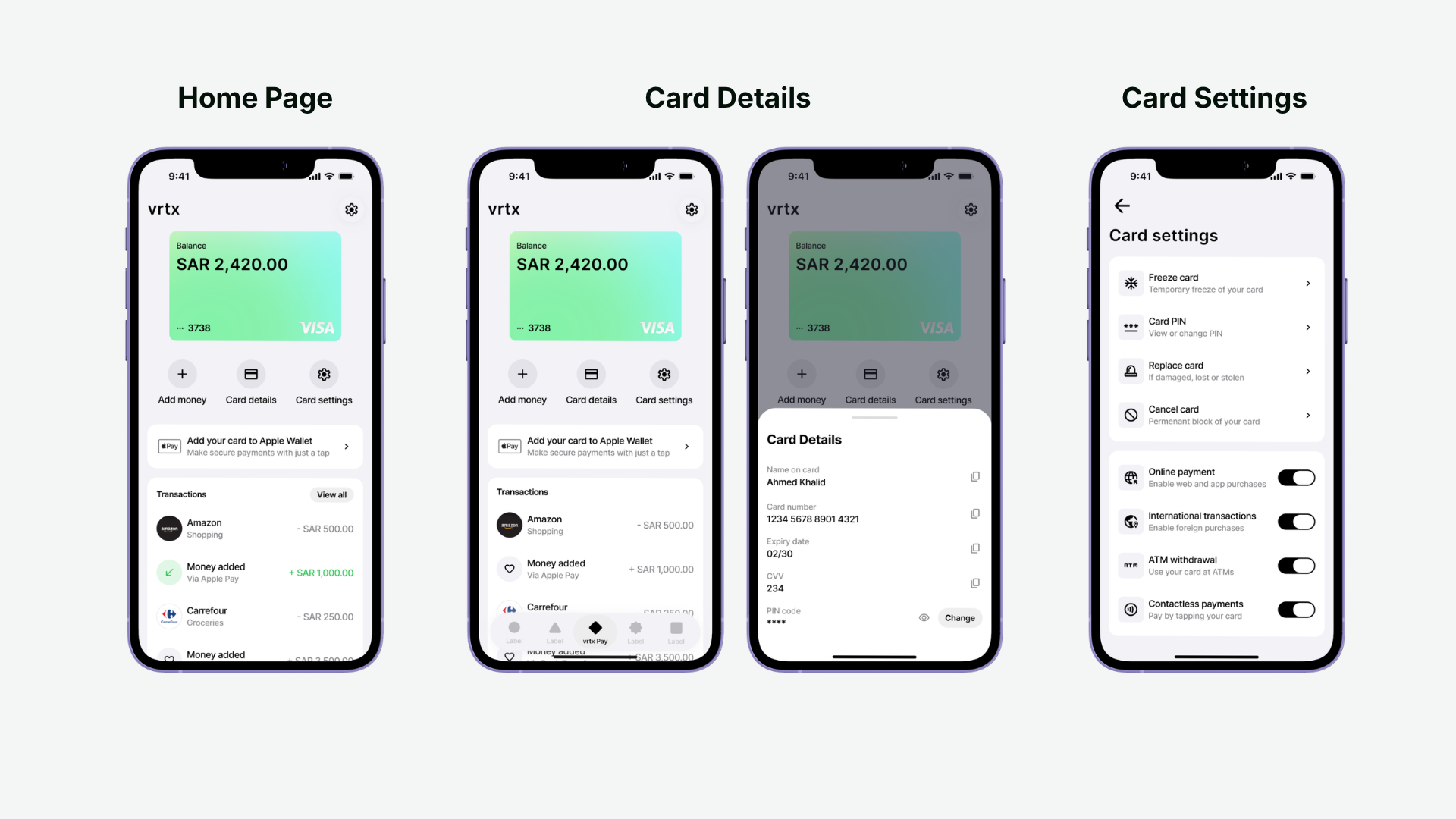
Three layout variants are available for the Home and Card Settings screens — Option A, B, and C. Pick whichever best fits your app's navigation model.
Layout option A
Layout option B
Layout option C
Coming soon
Dark mode
Automatic theme switching based on system appearance.
Layout flexibility
Additional Home and Card Settings layout variants beyond Options A–C.
Client icon pack
A bundled set of icons for common line-of-business use cases.
Input field style variants
Additional visual styles for text fields.
Quick reference
Everything below is customized today via SDK Initialization.
| I want to change... | Notes |
|---|---|
| Brand colors, spacing, corner radius, sizing | See the Colors, Spacing, Radius, and Sizing sections above |
| Brand name | Shown at the top of the Home screen |
| Brand logo | Shown next to your brand name |
| Wallet card artwork | Replaces the default gradient shown on the wallet card |
| App font | Applied across the whole app |
| Language / right-to-left support | Also determines which localized strings are shown |
| Home / Card Settings layout | Three variants available — Option A, B, and C |